
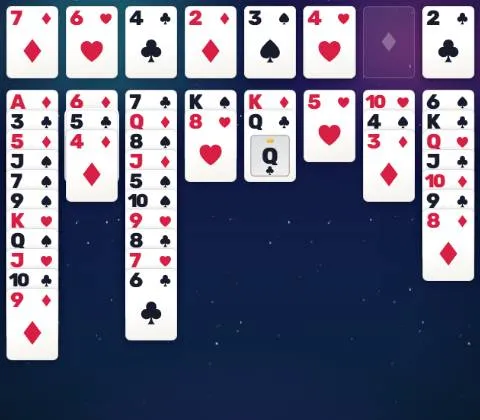
How to play FreeCell Solitaire
- Build four foundations, one per suit, from Ace up to King. The game is won when all 52 cards are on the foundations.
- All the cards are dealt face up in eight columns. In a column, place a card on a card one rank higher of the opposite color: a red 6 goes on a black 7.
- Each free cell at the top left holds one card, for as long as you like. Use them to get a card out of the way.
- An empty column takes any card. You move one card at a time, but a run in order moves in one go when there is enough room: with four empty free cells, up to five cards, and each empty column doubles that.
- Easy gives four free cells and deals that open up quickly, Classic four free cells and any deal, Expert only two free cells.
- Tap a card to send it to its best place: a foundation first, then a column, then a free cell. Or drag it where you want. When every column is in order, the Finish button sends all the cards home.
Tips
- Free the Aces and Twos first: dig into the columns that hide them.
- Keep your free cells empty as long as you can: each full cell shortens the runs you can move.
- An empty column is worth more than a free cell: it doubles the size of the runs you can move.
- Look a few moves ahead before you play: FreeCell hides nothing, so every deal can be planned.
- Hint (or H) suggests a good move worked out from your current position. Undo (U or Ctrl+Z) takes back as many moves as you like.
About FreeCell Solitaire
FreeCell was created by Paul Alfille in 1978 and became famous in the 1990s when Windows included it. Unlike most solitaires, every card is visible from the start: it is a game of planning, not of luck.
Almost every FreeCell deal can be won. Here, every one can: each deal comes from a bank of deals solved in advance by a computer, at every level, two free cells included.
Statistics for each level keep your games played, win rate, streaks, best time and fewest moves.
Customize lets you play left-handed (foundations on the left), send safe cards to the foundations automatically, hide the move counter, and choose among ten card backs and seven tables, three of them gently animated.
Points and badges
Finishing a game of FreeCell Solitaire earns points for your level. Four badges are waiting in this game, from bronze to diamond: each one says what to do and adds bonus points.
Questions
Can every FreeCell deal be won here?
Yes. Every deal comes from a bank of deals solved in advance by a computer, at all three levels, so each one has at least one winning sequence of moves.
How many cards can I move at once?
As many as fit in the free space, as if you moved them one by one: the number of empty free cells plus one, doubled for each empty column. With four empty free cells and no empty column, that is five cards.
What is the difference between Easy, Classic and Expert?
Easy gives four free cells and deals that our solver unlocks quickly. Classic is the traditional game, with four free cells and any deal. Expert leaves only two free cells: far fewer cards can wait, and every move must be planned.
Do cards go to the foundations on their own?
No, unless you choose it. Tap or double-tap a card to send it up, or turn on Auto-move to foundations in Customize: only cards that can no longer be useful then go up on their own.
Can I play left-handed?
Yes. In Customize, turn on Left-handed: the foundations move to the left and the free cells to the right.
How do I earn the badges?
Bronze for your first win, silver for five wins, gold for a win at Expert with only two free cells. Diamond is the real feat: win five Expert games in a row, without losing or giving up a game in between.